Book a demo
DICOM Modality Worklist server

Every order on the right scanner. Every name spelled right.

WorklistBridge turns HL7 orders from your RIS or HIS into a worklist your modalities query directly. Routing is set up in a browser form, not in code, and every answer comes straight from the database.

Configuration without code Runs on-premises Windows 11 or Windows Server Works with any worklist-capable modality
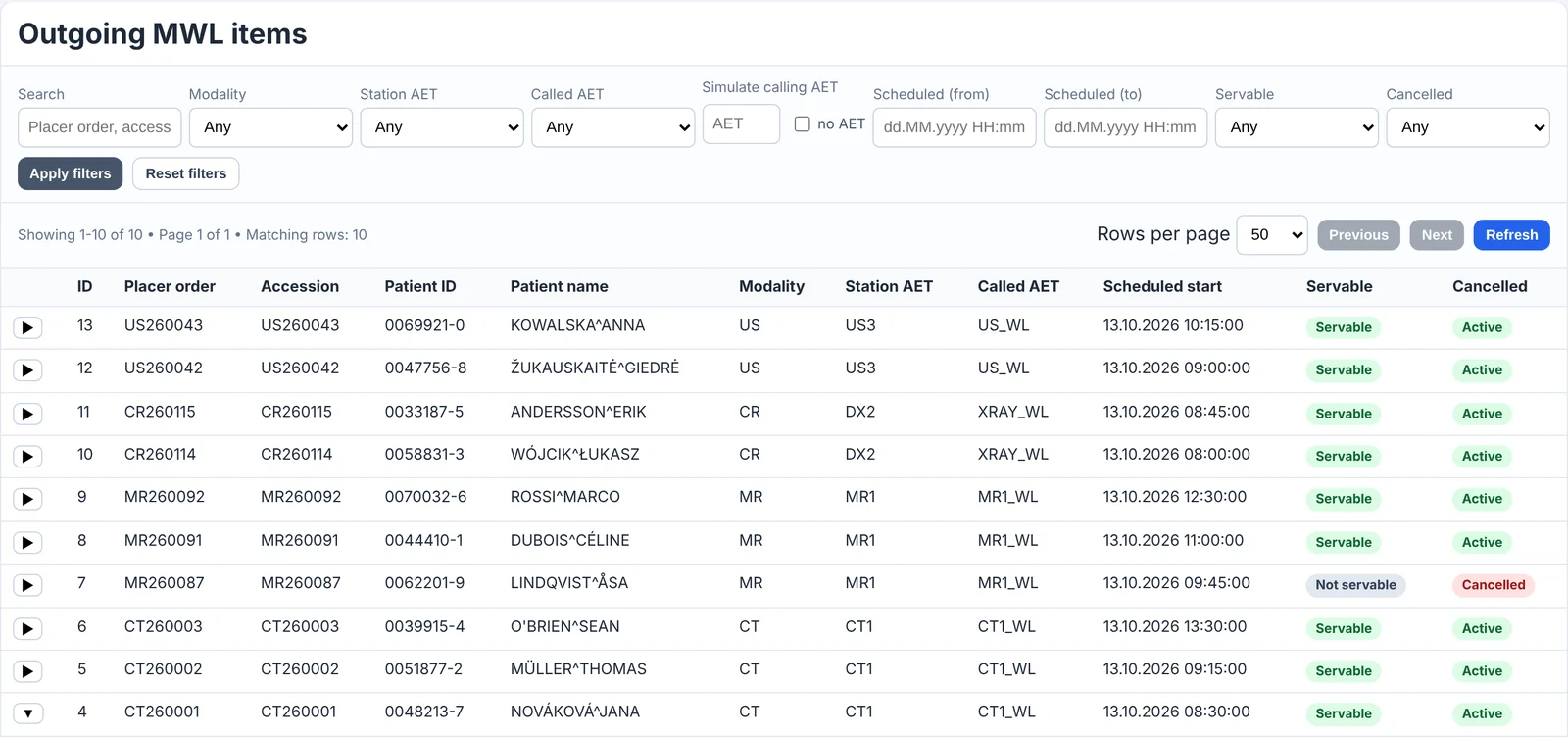
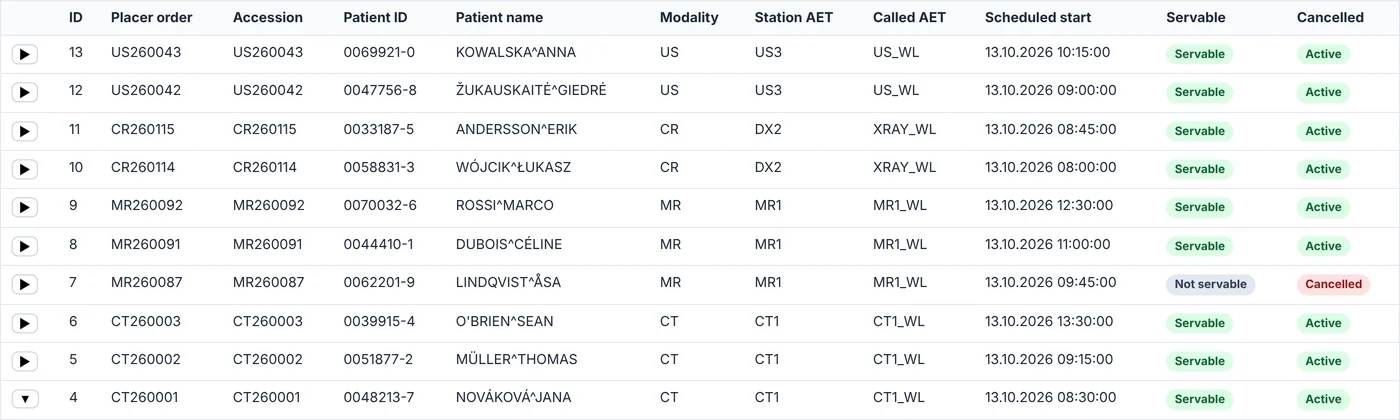
WorklistBridge's dashboard listing tomorrow's worklist items for CT, MR, X-ray and ultrasound rooms, one of them marked cancelled.

The real dashboard, with fictional patients.

New to worklists?

What is a Modality Worklist?

A Modality Worklist (MWL) is the DICOM service a scanner uses to fetch its schedule. Instead of a radiographer typing the patient's name, ID and exam into the CT or MRI console, the scanner asks: "What is booked for me today?" The worklist server answers with every scheduled patient, details already filled in.

That means no typing mistakes, images that always carry the right accession number, and studies that land in PACS against the right order.

Your RIS or HIS sends orders as HL7 messages. Scanners only understand DICOM. WorklistBridge is the piece in the middle that turns one into the other.

HL7 order
The message a RIS or HIS sends when an exam is booked, changed or cancelled.
Modality
A scanner or imaging device: CT, MRI, X-ray, ultrasound, mammography.
AE title
The name a DICOM device uses on the network, such as CT1.
How it works

From order to scanner, with nothing in between to babysit

WorklistBridge sits between the system that places orders and the modalities that perform them.

Receive

Takes orders as files your RIS saves to a folder, or as messages it sends over the network.

Route

Matches each order to a device with rules you set in the dashboard. Unmatched orders are flagged, never dropped silently.

Store

Writes patient, order, Study UID and worklist item in one transaction. Resent orders update, cancelled ones disappear.

Serve

Answers each modality's worklist query from the database, so the scanner always sees the current state.

Orders arrive the way your RIS already sends them

As filesYour RIS saves each order as a file in a shared folder. WorklistBridge picks it up as soon as the file is complete.
As network messagesYour RIS sends each order straight to WorklistBridge and gets a reply confirming it was accepted. In HL7 terms, this is MLLP.
From FHIR systemsNewer EHRs can send FHIR R4 orders to WorklistBridge's web endpoint.

All three use the same routing rules, so a scanner's worklist looks the same whichever way an order arrives.

Three Windows services, one database

HL7 ImporterReceives orders, routes them and writes them to SQL Server.
Worklist ServerAnswers the scanners' DICOM worklist queries.
Web DashboardMonitoring, configuration and diagnostics in the browser.

Each service starts automatically with Windows. They can share one PC or run on separate machines.

Configuration without code

Routing is a form, not a programming job

General-purpose interface engines can route anything, as long as someone writes and maintains the script. Here, sending orders to a scanner is one line in the dashboard.

The usual wayA general-purpose interface engine
// destination filter, one per scanner
var room = msg['OBR']['OBR.18']
  ['OBR.18.1'].toString();
if (room == 'CT_ROOM_1') return true;
if (room == 'CT_ROOM_2') return true;
logger.warn('No route: ' + room);
return false;
  • Written and tested by an integration specialist
  • Edited and redeployed for every new room or scanner
  • An unrouted order turns up later, in a log file
With WorklistBridgeRouting rules in the dashboard. Try adding one.
FieldWhen the value isSend toRemove

Where the next orders go Preview
Applies to the next orderNo restart and no redeploy. The importer reads the rules for every order.
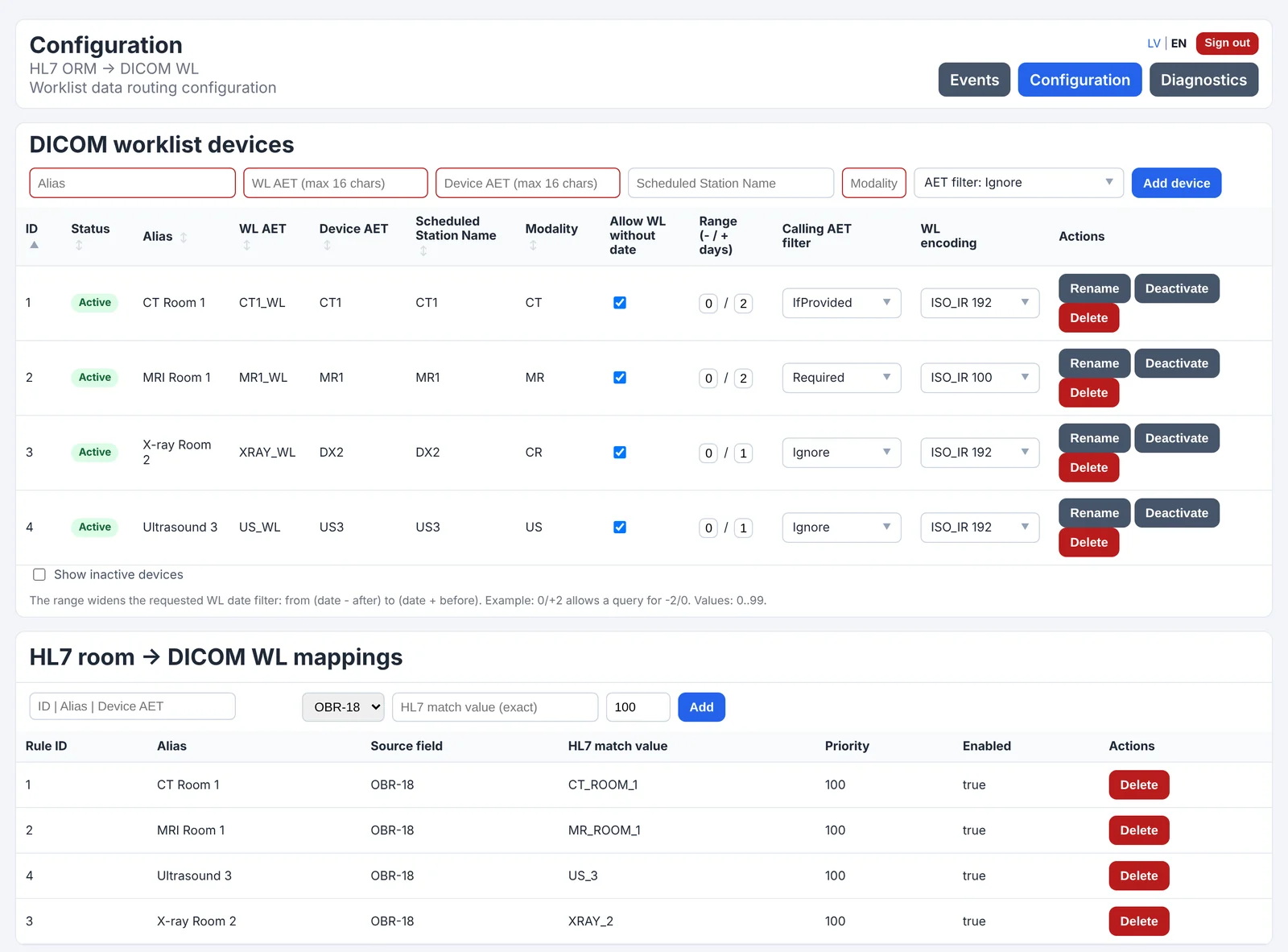
OBR-18 or OBR-19Route on either field, with a priority and an on/off switch per rule.
Devices on the same pageAE titles, shared pools, date range, caller check and character set for each scanner.
Nothing lostAn order with no matching rule is flagged on the dashboard and logged with its order number.
Transparent mapping

See exactly where every field goes

An HL7 order and the worklist item it becomes. Pick a field to follow it across.

HL7 orderORM^O01, version 2.3
MSH|^~\&|RIS|HOSP|MWL|HOSP|20261013081500||ORM^O01|MSG20431|P|2.3
PID|||0048213-7||NOVÁKOVÁ^JANA||19850312|F
ORC|NW|CT260001
OBR|1|CT260001||CT_HEAD^CT HEAD WITHOUT CONTRAST||||||||||||SØRENSEN^MADS||CT_ROOM_1||||||||||||||||||20261013093000

Routing rule: OBR-18 = CT_ROOM_1 sends the order to device CT1 (modality CT).

Worklist itemreturned to CT1
Patient name(0010,0010)NOVÁKOVÁ^JANA
Patient ID(0010,0020)0048213-7
Birth date(0010,0030)19850312
Sex(0010,0040)F
Accession number(0008,0050)CT260001
Referring physician(0008,0090)SØRENSEN^MADS
Requested procedure(0032,1060)CT HEAD WITHOUT CONTRAST
Procedure code(0032,1064)CT_HEAD
Scheduled step
Modality(0008,0060)CT
Station AE title(0040,0001)CT1
Start date(0040,0002)20261013
Start time(0040,0003)093000
PID-5

The patient name keeps every accent from order to scanner. Name components are never reordered.

Product tour

Everything that happens, on one screen

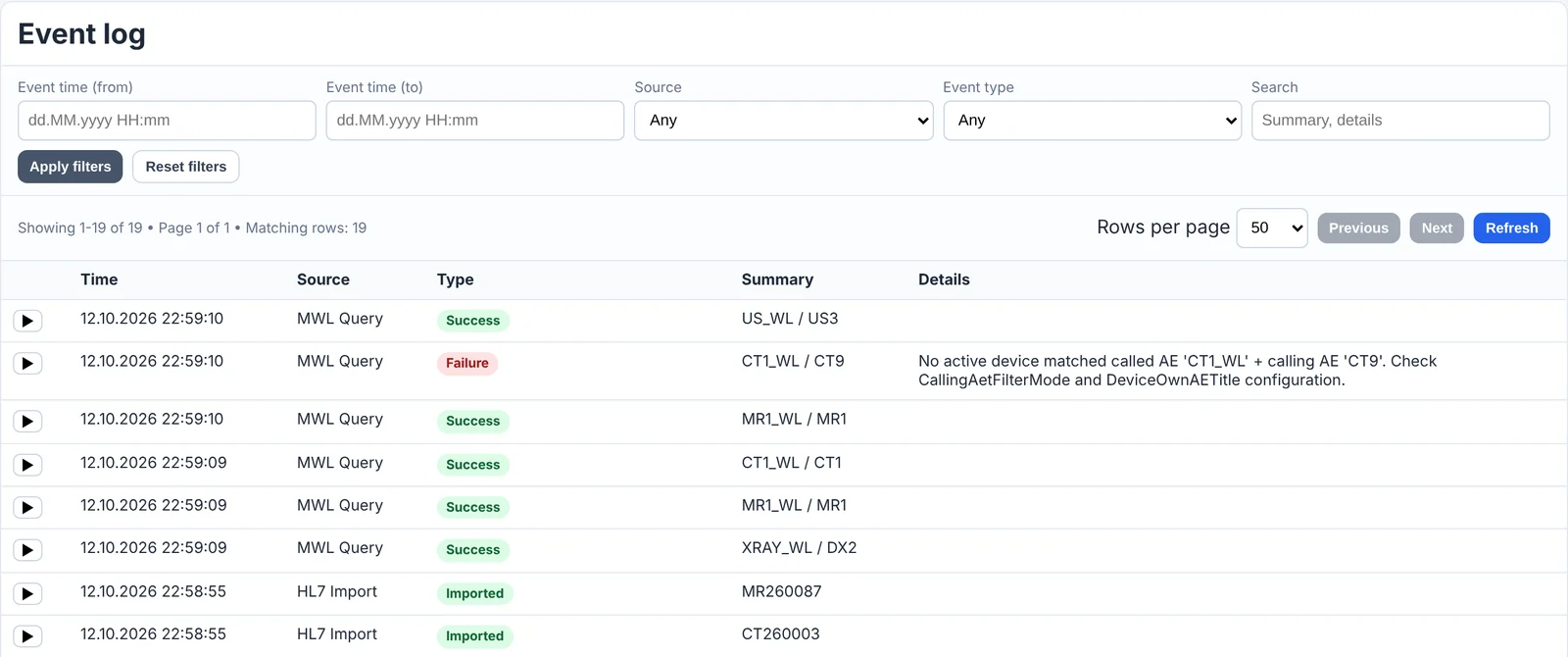
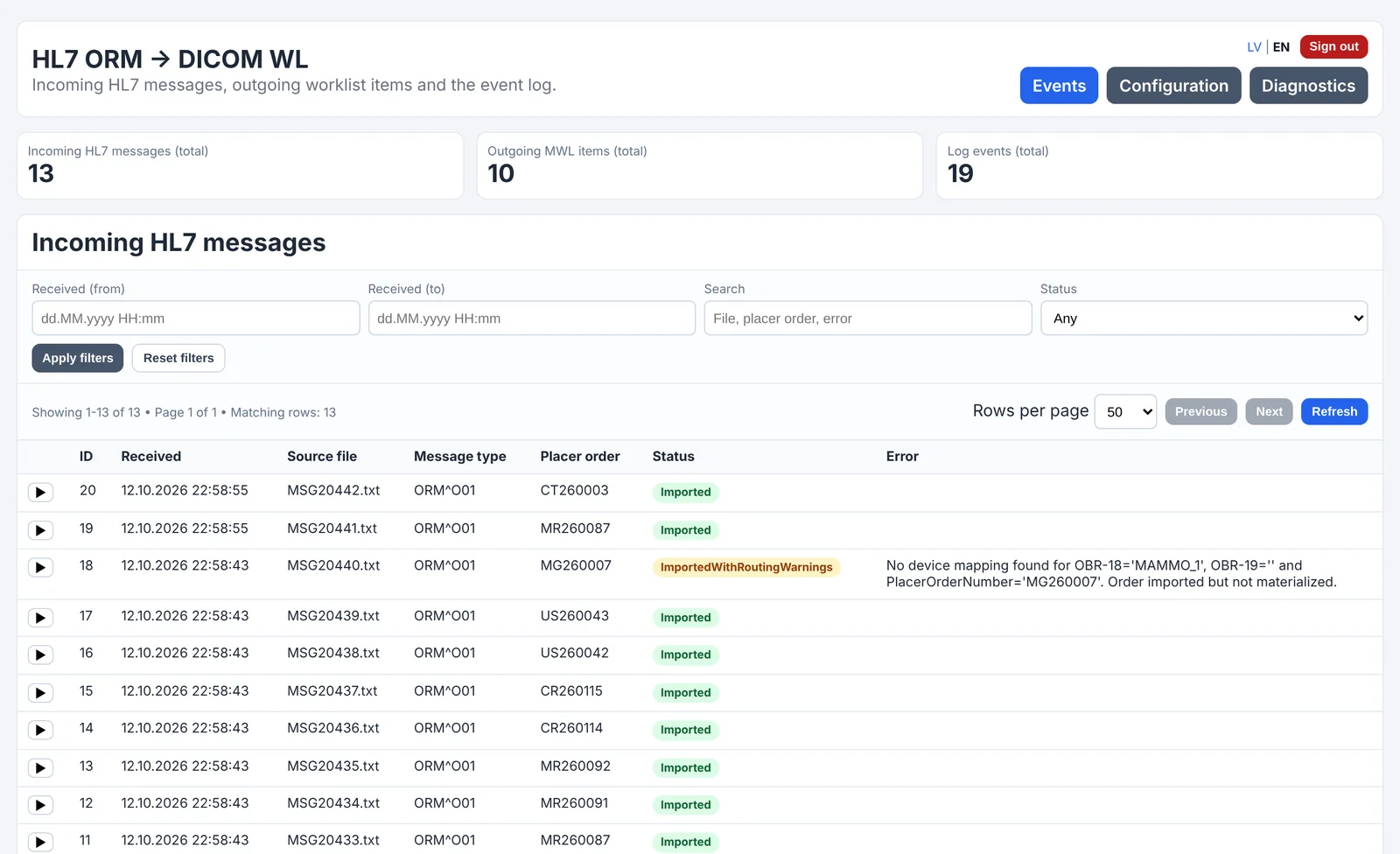
The dashboard shows every message received, every worklist item served and every query a scanner made. Filter, search and open any row for details.

Dashboard home with totals and the list of incoming HL7 messages. A mammography order is flagged ImportedWithRoutingWarnings because no routing rule matched it.
Totals and every HL7 message received. An order no routing rule matches is flagged with the reason, not lost.
Features

Built around the problems that stop a worklist working

Parsing HL7 is the easy part. The hard part is deciding which scanner sees which order, getting names through intact, and finding out why a list came back empty.

Shared worklist pools

One worklist address for a whole department

Several scanners can share one worklist address. Each one can ask for just its own orders, or for the whole department's list when a patient is moved to the room next door. Adding a scanner to the pool is a dashboard change, and the other scanners keep their settings.

  • One address to set on every scanner in the department
  • Own orders or the whole pool, chosen by the scanner's query
  • Keep a scanner's orders private: ignore, check if sent, or require its AE title
  • Query matching on modality, date, patient ID, accession number and station
Shared worklist address WL-POOLExample
DeviceCaller checkOrders today
CT-ARequired2
CT-BIf provided2
CT-CIgnore1

International character sets

Names arrive the way they were typed

Text is stored and sent as UTF-8 by default. For older modalities that need a single-byte character set, you pick the set per device and only that scanner's copy is converted. Everything else keeps the original.

  • Six DICOM character sets, chosen per device
  • Stored text never changes; conversion happens only on the way out
  • Patient IDs kept exactly as received
Patient name by device setting
Character setSent to the scannerResult
Diagnostics

When a worklist comes back empty, it tells you why

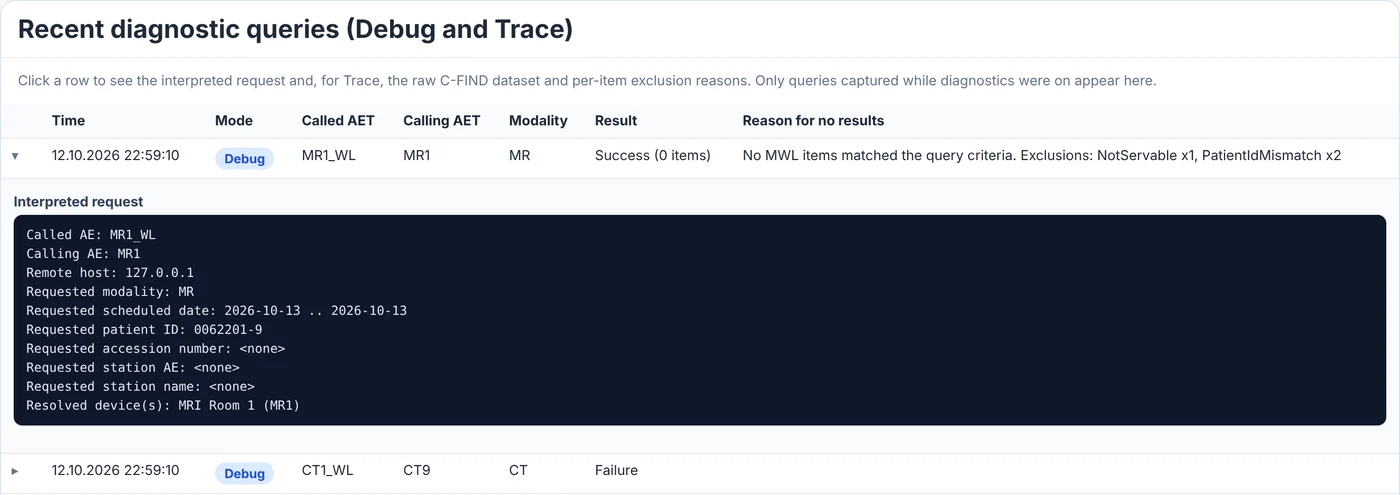
"The patient isn't on the list" is the most common support call. Turn on diagnostics from the dashboard, with no restart, and every empty query is recorded with the reason each order was left out.

  • Debug mode explains empty results
  • Trace mode keeps the raw query and a decision for every order
  • Diagnostics only explain; the worklist itself is unchanged
Diagnostics list of recent worklist queries. An MRI query that returned nothing is expanded, showing the requested patient ID and the reasons: one order not servable, two for other patients.
An MRI asked for a patient whose order had been cancelled. The query, and why nothing came back, are on record.
Modality compatibility

Accepted by the strictest modalities

Some scanners reject a worklist response that leaves out anything they asked for, even an empty value. WorklistBridge answers every requested attribute and always fills the ones that must not be empty.

In every worklist item
Requested procedure IDAlways filledModalities that copy it into the study ID always get a value.
Procedure and protocol codesCodedCode, coding scheme and meaning, not just free text.
Scheduled step IDAlways filledTaken from the order when present, otherwise numbered automatically.
Study descriptionIncludedFor modalities that read the procedure name from it.
Anything else requestedAnsweredReturned empty when there is no data, so the response always matches the query.

Live operations dashboard

Incoming messages, outgoing worklist items and the event log, with fast filtering. Check what a scanner will receive before anyone walks to the ward.

Three ways in, one pipeline

Files, network messages and FHIR R4 orders go through the same routing, so every scanner gets the same result whichever way an order arrives.

Cancellations that cancel

Configurable cancel codes. A cancelled order leaves the worklist at once and stays in the audit trail.

Stable Study UIDs

Generated once per order under your organisation's UID root, and kept when the order is updated.

Secure by default

The dashboard requires an admin password set on first run, with anti-forgery protection on every form.

Made for closed networks

The licence key is checked on site and nothing calls home, so WorklistBridge runs on hospital networks with no internet access.

Standards

Speaks the standards your systems already use

Orders in

HL7 v2.3 ORM^O01Several procedures per order; optional segments may be missing.
HL7 v2.5.1 ORM^O01 and OMI^O23IHE Scheduled Workflow orders, with clear rejection of unsupported message types.
HL7 over the network (MLLP)Orders sent straight from the RIS, each one acknowledged. Files in a shared folder work too.
FHIR R4Order intake from FHIR-based EHRs through the same pipeline.

Worklist out

DICOM Modality Worklist (C-FIND)Several worklist AE titles on one server.
Six DICOM character setsUTF-8, Latin-1, Latin-2, Latin-4, Cyrillic and ASCII.
Stable Study Instance UIDsGenerated under your organisation's UID root.
Deployment

Runs on your server, next to your database

Patient data stays inside your network. Install the three services on any Windows 11 PC or Windows Server, point them at SQL Server, and give each scanner its worklist address.

Operating system
Windows 11 or Windows Server, 64-bit. A server licence is not required.
Services
HL7 Importer, Worklist Server and Web Dashboard, each a Windows service
Database
Microsoft SQL Server, including the free Express edition, with versioned upgrade scripts
Runtime
.NET 8
Order intake
Files in a shared folder, or messages over the network (HL7 MLLP or FHIR R4)
Worklist
DICOM C-FIND on the port you choose
Administration
Browser dashboard on your internal network
Licence
Key checked on site, no internet connection needed

Focused on one job

WorklistBridge does not store images, act as a PACS or send messages back to the RIS. It fits in front of the systems you already run instead of replacing them.

Pricing

One licence per site, priced by modality count

Pay once and add yearly updates and support, or take a yearly subscription. Every tier includes every feature and every supported standard.

Clinic

Up to 3 modalities

€1,900one-time

or €790 per year as a subscription

  • Updates and support €390 per year
  • Buy online by card

Hospital

Up to 30 modalities

€9,500one-time

or €3,900 per year as a subscription

  • Updates and priority support €1,900 per year
  • Purchase order and invoice

Enterprise

Unlimited modalities, several sites

From €15,000

Quoted per project

  • High-availability guidance
  • Service level agreement
30-day free trialEvery feature, on your own PC or server, arranged by email, for evaluation.
What counts as a modalityEach active device in the configuration. A pool of three scanners sharing one worklist address counts as three.
Setup serviceWe can connect your RIS or HIS for you, at a fixed price per HL7 feed, including routing rules and go-live.
Perpetual means perpetualIf you stop paying for updates, the worklist keeps running on the version you have.
Offline licence keyActivated on site and checked locally, with no connection back to us.
Resellers and OEMPartner pricing for integrators and RIS, PACS or modality vendors.

Prices in euros, excluding VAT. One site is one installation with one database, serving any number of worklist addresses.

See it answer your own scanners

Trials are free for 30 days and arranged by email, so we can help you connect your first order feed. In a short call we show you the worklist each scanner would receive.

Sales and trials
sales@worklistbridge.com
Web
worklistbridge.com
Company
Clevus LTD

Request a trial

Fill in the form to open an email to sales@worklistbridge.com with your details filled in, or send the same details yourself. Please write from your work address.

  • Who you are and where you work
  • How many modalities would use the worklist
  • Which system sends the orders, and how

Please don't send real patient data. If you'd like us to check sample messages, we'll ask for anonymised ones.